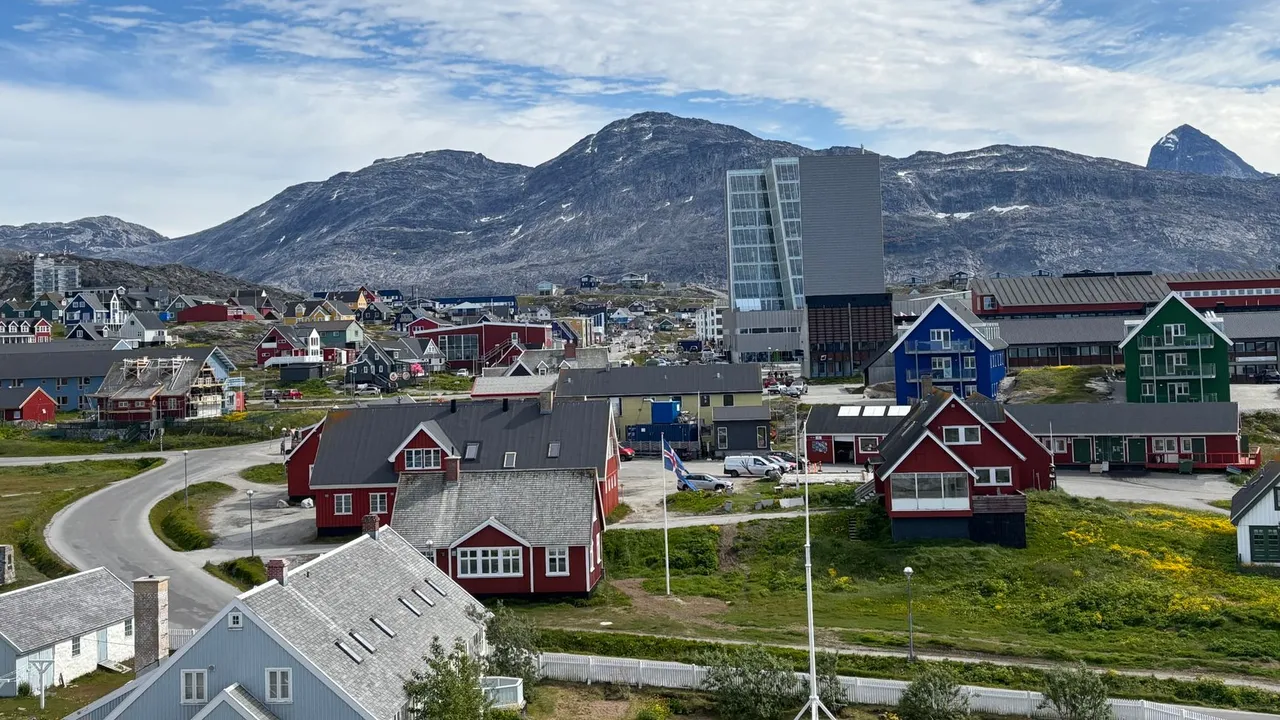
eSIM for Greenland 
Viasimo's Greenland eSIM starts at $10.99 for 1 GB over 1 day, running on Tusass with 4G LTE where available. Plans last 1 to 180 days, arrive by email in minutes and install from your phone's settings, with no app.
Works everywhere in Greenland
- Avannaata
- Kujalleq
- Qeqertalik
- Qeqqata
- Sermersooq
Duration







Unlimited data · 3 Days ×1
$58.00
Does my phone take an eSIM? Check now
Dial *#06# on your phone. If you see an EID number, your phone takes an eSIM. Most phones sold since 2019 do.
Not sure it works on your phone? Check compatibilityWhich networks does the Greenland eSIM use?
Host networks: Tusass
Your eSIM picks one automatically; you do not choose or switch between them.
- Data
- 1 GB – 20 GB or unlimited
- Validity
- 1–180 days
- Speed
- 4G LTE
- Hotspot / tethering
- Supported on most devices
- Activation
- Starts when you first connect in your destination
- Speed management
- Roughly 2-3 GB per day at full speed, sometimes less depending on the local carrier, then reduced
- Text messages (SMS)
- Data only: use an app for verification codes
- Connects via
- United States
- Unused validity
- 180 days before it must be installed
How much data do you need?
The allowances below are our sizing recommendations, not measurements. The plan beside each one is the cheapest option on this page that covers it.
| You are | Plan for | Cheapest plan that covers it |
|---|---|---|
| LightMaps, messaging and the occasional lookup | About 1 GB a week | $11.991 GB, 7 days |
| TypicalMaps, social, photos and some browsing | About 3 to 7 GB a week | $45.995 GB, 30 days |
| HeavyVideo streaming, video calls and uploads | 10 GB a week or more | $88.9910 GB, 30 days |
| Working or sharingTethering a laptop, calls and cloud sync | 20 GB a week or more | $134.99Unlimited, 7 days |
eSIM, local SIM or roaming?
Charged per day
Your carrier roaming
Queue and plastic
A SIM at the airport
$10.99
Viasimo, one bundle
Only the Viasimo figure is a price: it comes from today’s live catalog. The other two rows are directional, not quoted rates.
Important to know
- This is a data-only eSIM. It carries no calls or SMS on its own number.
- Your existing number stays on your primary SIM, so calls and verification texts keep working.
- Your phone must support eSIM, and some carrier-locked phones cannot install one.
- Signal varies with location, terrain, congestion and your handset. Dense urban areas are consistently better served than remote ones.
- The eSIM selects a host network automatically. You cannot pick or switch between them.
- Unlimited plans run at full speed up to a fair-use limit, then continue at a reduced speed. Read the fair usage policy
Frequently asked questions
Does an eSIM work in Greenland?
Yes. Your Greenland eSIM connects automatically the moment you arrive, with no roaming fees and nothing to set up at the airport. The host networks it can use are Tusass. Coverage runs on 4G LTE. There is no 5G on our host network in Greenland yet.
Do I get 5G in Greenland?
No. Tusass do not yet offer 5G to visitors in Greenland, so your eSIM connects over 4G LTE or slower. Anyone claiming 5G for this destination is quoting a spec sheet, not the network you will actually get.
Is TELE Greenland the same as Tusass?
Yes. TELE Greenland, the state-owned telecoms company, rebranded as Tusass in 2021. It holds a licensed monopoly on most telecoms in Greenland, so it runs the only mobile network you will find there. Your eSIM's network may be listed as TELE Greenland while your phone shows Tusass, and both names mean the same network.
Does 3G still work in Greenland?
No longer, or not for long. Tusass scheduled its 3G network to shut down in April 2026, with 2G to follow in 2027. That leaves 4G as the main layer in towns, and Tusass launched its first 5G services in May 2026. Your eSIM uses 4G LTE, so bring a phone that supports 4G.
Do international flights to Greenland still land at Kangerlussuaq?
Mostly not. Since Nuuk's 2,200 m runway opened on 28 November 2024, Air Greenland's Copenhagen hub has been at Nuuk (GOH), along with Icelandair and seasonal SAS and United services. Kangerlussuaq (SFJ) keeps seasonal Copenhagen stopover flights, and in 2025 it was reactivated as a hub at least three times when Nuuk was disrupted.
Why is mobile data slow in some Greenland villages even with full signal?
Settlements that aren't on Tusass's Greenland Connect submarine cable reach the internet by satellite, now mainly GreenSAT, which serves places such as Qaanaaq and remote farms in South Greenland. The local mast may show strong 4G, but the satellite link behind it is shared by the whole community. Messages and maps usually work, while video and big uploads crawl.
What is the emergency number in Greenland?
Dial 112, which is answered in Greenlandic, Danish and English. The eSIM is data-only, so call from your home SIM, which can reach emergency services while roaming, or from a landline. Outside towns there is usually no mobile coverage at all, so hikers and boat passengers should rely on guides and satellite communicators instead.
How much data do I need for 7 days in Greenland?
For 7 days in Greenland, Viasimo sells 1 GB for $11.99 and unlimited data for $134.99. Our sizing recommendation, not a measurement: maps, messaging and the occasional lookup, about 1 GB a week; maps, social, photos and some browsing, about 3 to 7 GB a week. The data calculator on this site works it out from how you actually use your phone.
Installing, keeping your number, topping up and hotspot work the same everywhere: see how it works →
Greenland: what to know before you land
Greenland has one telecoms company, the state-owned Tusass, which was called TELE Greenland until 2021. Your eSIM uses its 4G LTE network. The country's flight map also changed in November 2024, when Nuuk's long runway opened and Air Greenland moved its transatlantic hub there from Kangerlussuaq. Both changes affect how you plan your first day online.
- Emergency
- 112
- Plugs
- CEFK 230V
- Currency
- Danish krone (DKK)
Main airports
- GOH Nuuk Airport
- SFJ Kangerlussuaq Airport
- JAV Ilulissat Airport
Nuuk's new runway (GOH) and Kangerlussuaq's changed role
Nuuk Airport (GOH) opened its full 2,200 m runway on 28 November 2024, after a new terminal opened earlier that year. It is now Air Greenland's hub, with flights to Copenhagen. Icelandair flies year-round to Reykjavík–Keflavík, SAS adds seasonal Copenhagen flights, and United began seasonal flights to Newark in June 2025.
Kangerlussuaq (SFJ), the old gateway, had its last regular scheduled Copenhagen departure on 27 November 2024. It still handles seasonal Copenhagen stopover flights, and it was clarified in 2024 that the airport will stay open to larger aircraft. Domestic links from it have been cut back, though. Flights to Aasiaat, Maniitsoq and Narsarsuaq were dropped, and those to Nuuk, Ilulissat and Sisimiut reduced.
Weather is what makes data valuable here. In 2025, Kangerlussuaq was brought back into use as a temporary hub at least three times when weather or security problems disrupted Nuuk. If that happens on your travel day, rebooking messages and gate changes reach you by app or email. Switch on your eSIM as soon as you land and keep notifications on.
Tusass, the 3G switch-off and Greenland's first 5G
Tusass, founded in 1879 as a postal and telegraph service, holds a licensed monopoly on most telecoms in Greenland. It was named TELE Greenland from 1997 and rebranded as Tusass in 2021. Your eSIM's network is listed as TELE Greenland, but your phone may show Tusass. It is the same network.
The network is changing quickly. 4G first launched in Nuuk in December 2013 and has since spread to other towns. The 3G network was scheduled to close in April 2026, with 2G following in 2027. Tusass also switched on its first 5G services in May 2026.
Your eSIM connects on 4G LTE, so make sure your handset supports 4G on standard bands. Most phones sold in the last several years do. With 3G gone, an older phone that can't use 4G has very little to fall back on.
Tusass publishes an operating status page that lists current outages by area. If data stops working in a settlement, check it on hotel wifi before assuming the problem is your phone. Storms and equipment faults do take places offline here.
Greenland Connect cable towns and satellite-served settlements
How fast your connection feels depends a lot on how your town reaches the outside world. Tusass owns Greenland Connect, a submarine cable system, and towns along it get the strongest internet in the country. Places off the cable rely on satellite. In 2023 Tusass moved its satellite service to a new satellite, GreenSAT, which serves remote sheep farms in the south and Qaanaaq in the far north-west, among others.
In a satellite-served settlement, your eSIM may still show a solid 4G signal from the local mast. The bottleneck is the link behind the mast, which carries the whole community's traffic. Expect messaging, email and maps to work, and expect video calls, streaming and photo backups to be slow or to stall. Save big uploads for a town on the cable, or for when you are back home.
If you are combining Nuuk or Ilulissat with a remote village or a sheep farm in South Greenland, download maps, tickets and booking confirmations while you are still in town. Send any important files before you leave.
The emergency number throughout Greenland is 112, answered in Greenlandic, Danish and English. The eSIM is data-only, so call from your home SIM.
Researched October 2026 · 5 sources
- en.wikipedia.org Tusass (Wikipedia)
- en.wikipedia.org Nuuk Airport (Wikipedia)
- en.wikipedia.org Kangerlussuaq Airport (Wikipedia)
- tusass.gl Tusass (official site)
- en.wikipedia.org 112 (emergency telephone number) (Wikipedia)
Seven days in Greenland: Nuuk and the Ilulissat Icefjord
A summer week split between Nuuk, the capital and main international gateway, and Ilulissat on Disko Bay, where the UNESCO-listed Icefjord fills the sea with icebergs. There are no roads between towns, so the route uses two Air Greenland flights and several boat trips.
When to go June to August brings the midnight sun around Ilulissat, open water for Eqi glacier and iceberg boat trips, and the most reliable flights; February to April suits dog-sledding and northern lights, but many boat trips do not run and weather delays are more common.
-
Day 1 Nuuk
Nuuk: the colonial harbour and the national museum
Nuuk Airport (GOH) is a short taxi ride, about 10 minutes, from the centre.
From the airport, head to the old colonial harbour area (Kolonihavnen), where the 19th-century wooden buildings, Our Saviour's Church and the waterfront sit below the modern city. Visit the Greenland National Museum, which holds the 15th-century Qilakitsoq mummies, Thule-era kayaks and skin clothing. In the evening, walk the coastal path from the harbour towards the Katuaq cultural centre, the wave-shaped building in the centre that houses a cinema and concert hall.
Signal Nuuk is on the Greenland Connect submarine cable, so Tusass 4G is the fastest you will get in the country; turn on notifications in case of weather-related flight changes.
-
Day 2 Nuuk
Nuuk fjord by boat and a hike above the city
Join a morning boat trip into the Nuup Kangerlua fjord system, one of the largest in the world, to look for humpback whales in summer and to see the abandoned settlement of Qoornoq or the ruins of a Norse farm, depending on the operator. In the afternoon, hike up Quassussuaq (Little Malene), a marked trail behind the city with views across the fjord and the peak of Sermitsiaq. Wear proper boots, as the path is steep and rocky.
Signal There is no mobile coverage once the boat is out in the fjord; on the Quassussuaq trail you keep 4G for much of the climb because it overlooks the city.
-
Day 3 Ilulissat
Fly to Ilulissat: Sermermiut and the Icefjord
Air Greenland flights from Nuuk to Ilulissat take about 1 hour 30 minutes; Ilulissat airport is a few minutes from town by taxi.
Take the morning flight north to Ilulissat. After checking in, walk to the Ilulissat Icefjord Centre, which explains how the Sermeq Kujalleq glacier feeds the fjord, then follow the boardwalk into the Sermermiut valley, the site of a settlement used for about 4,000 years. At the end, you look out over the mouth of the Icefjord, packed with icebergs. Return on the yellow-marked trail along the cliffs.
Signal Ilulissat town has Tusass 4G, which reaches the Icefjord Centre and the start of the boardwalk but fades on the clifftop trail.
-
Day 4 Ilulissat
Boat trip to the Eqi glacier
About 3–3½ hours each way by boat from Ilulissat; tours run in summer only.
Spend the day on a boat trip north across Disko Bay to the Eqi glacier, where the ice front is several kilometres wide and regularly calves into the sea. Boats wait off the face for a couple of hours so you can watch and hear the ice breaking. Bring warm layers, hats and gloves even in July, and some food, although most tours serve lunch on board. You return to Ilulissat in the evening.
Signal You will be out of mobile coverage for most of the day; download podcasts and maps before you sail and save your tour confirmation offline.
-
Day 5 Ilulissat
Ilulissat town and a midnight iceberg cruise
In the morning, visit the Ilulissat Museum in the childhood home of the polar explorer Knud Rasmussen, then the small Inuit Art Museum. Walk down to the old harbour to watch fishing boats and visit the Zion Church on the headland. In the evening, join a boat trip among the icebergs at the mouth of the Icefjord; in June and July the sun stays up around midnight and lights the ice from low angles.
Signal 4G is reliable in the town centre and harbour; signal drops a short way out on the iceberg cruise.
-
Day 6 Ilulissat
Day trip to Ilimanaq or Oqaatsut
Boats from Ilulissat take about an hour to either settlement; schedules depend on the weather and the season.
Take a boat to Ilimanaq, a settlement of about 50 people south of the Icefjord, where you can walk among wooden houses and along the shore, or to Oqaatsut, a fishing village north of Ilulissat. Either trip shows you life in a small settlement. Experienced hikers can walk to Oqaatsut instead, a 5–7 hour route on rough ground that needs good navigation and arranged boat transport back.
Signal Small settlements may have a local mast, but their internet runs on a shared link, so expect messaging to work and photo uploads to stall; there is no coverage on the hike.
-
Day 7 Nuuk
Fly back to Nuuk and depart
Ilulissat–Nuuk flights take about 1 hour 30 minutes.
Take a last morning walk along the hill above Ilulissat's harbour or return to the Sermermiut boardwalk for another look at the Icefjord. Fly back to Nuuk for your international connection. If you have a few hours in Nuuk, visit the Nuuk Art Museum or walk along the Nuussuaq coast. Allow a buffer day if you can, as fog and wind regularly delay flights in Greenland.
Signal Good 4G at both airports and in Nuuk; keep Air Greenland app notifications on in case your connection is moved or rescheduled.
Staying connected on this route
- Download maps, boat tickets and flight confirmations in Nuuk or Ilulissat before boat trips and settlement visits.
- Your eSIM uses Tusass 4G LTE, so bring a phone that supports 4G; older 2G/3G-only handsets may not connect.
- Leave large uploads for Nuuk, which is on the Greenland Connect cable; satellite-served settlements share a small link.
- If data stops in a town, check Tusass's operating status page on wifi before troubleshooting your phone.
Itinerary sources · 4
- en.wikivoyage.org Wikivoyage: Ilulissat
- whc.unesco.org UNESCO World Heritage: Ilulissat Icefjord
- tusass.gl Tusass
- en.wikipedia.org Wikipedia: Nuuk Airport
Information and verification
Each block below says what was checked and when. Anything we cannot date, we do not claim.
- Prices and plans
- Every price and allowance on this page is read from the live catalog, not typed in.
- Host networks
- The operator list comes from the network partner that carries this eSIM.
Greenland eSIM prices
| Data | Price | Per day |
|---|---|---|
| Unlimited | $58.00 | $19.33/day |
| Data | Price | Per day |
|---|---|---|
| Unlimited | $92.00 | $18.40/day |
| Data | Price | Per day |
|---|---|---|
| Unlimited | $184.99 | $18.50/day |
| Data | Price | Per day |
|---|---|---|
| 3 GBBest value | $29.99 | $1.00/day |
| 5 GB | $45.99 | $1.53/day |
| 10 GB | $88.99 | $2.97/day |
| 20 GB | $174.99 | $5.83/day |
| Unlimited | $489.99 | $16.33/day |
| Data | Price | Per day |
|---|---|---|
| Unlimited | $979.99 | $16.33/day |
| Data | Price | Per day |
|---|---|---|
| Unlimited | $1,464.99 | $16.28/day |
| Data | Price | Per day |
|---|---|---|
| Unlimited | $2,924.99 | $16.25/day |
Destinations